Soluce Mode ·
How frame interpolation changes a GTA 6 console capture
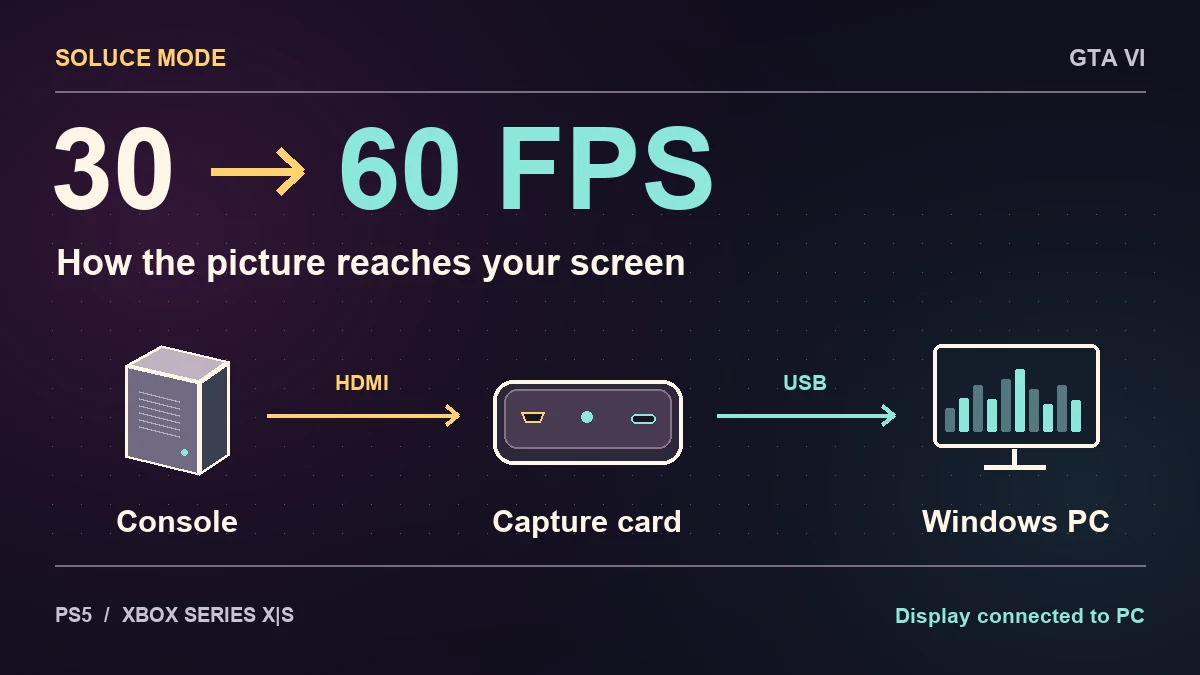
The device is an HDMI capture card. It sends the picture from your PS5 or Xbox to a PC, where Veyra or Lossless Scaling can generate an extra frame between each pair from the game. With a steady 30 FPS input, that gives you 60 displayed frames per second. Keep your controller paired with the console and play on the display connected to the PC.
Does GTA 6 have a native 60 FPS mode?
As of November 23, 2026, GTA 6 targets 30 FPS on PS5, PS5 Pro, Xbox Series X and Series S. Rockstar says the CPU also has to run the world simulation. Switching the console output to 1080p or selecting 120 Hz on the TV won't unlock a performance mode. Rockstar’s explanation to Kotaku
At a steady 30 FPS the game renders a new view roughly every 33.3 milliseconds. At 2×, the display can show a frame every 16.7 ms. Look out of a car window and pan past a row of shopfronts to see the difference. The generated frames contain no newer controller input.
What hardware do you need?
You'll need the console and game, a compatible HDMI capture card, an HDMI cable, the card’s USB data cable, a Windows PC with a GPU supported by your chosen software, and a display set to at least 60 Hz. Most laptops have an HDMI output. A USB capture card gives the console picture a way into the laptop.
For example, Elgato’s Game Capture Neo captures up to 1080p60 while passing up to 4K60 HDR through to a TV. Check the capture resolution in a card’s specs and the speed of your PC’s USB port before spending money. Game Capture Neo specifications
How to connect a PS5 or Xbox to your PC
- Connect the console’s HDMI output to HDMI IN on the card. Plug the card into a PC USB port that meets the manufacturer’s requirements.
- Leave the controller connected to the console. On PS5 or PS5 Pro, open Settings → System → HDMI and switch off Enable HDCP for gameplay capture. Turn it back on for protected video apps. Elgato’s PS5 setup guide
- Watch the PC display, or connect the PC’s video output to your TV. The card’s HDMI OUT is the direct console feed. It gives you a handy reference for judging picture quality and delay.
Method 1 · Veyra with a 60 Hz capture feed
Open the capture card source in Veyra. Select the card for video and audio, then check that you can see and hear the game before enabling enhancements. Start at 1080p if you're unsure what your GPU can process in real time.
If the card delivers 60 frames per second with each game frame appearing twice, enable 60 → 30 duplicate removal in the frame generation settings. Leave this off for a true 30 FPS capture feed. Choose a frame generation engine that supports your GPU, set the multiplier to 2×, and go full screen in Veyra. Veyra’s frame cadence settings
Method 2 · OBS Studio and Lossless Scaling
Add a Video Capture Device source in OBS and select your card. Set the OBS frame rate to 30 FPS under Settings → Video. Open a windowed projector of the preview. You can play through it with recording turned off. OBS video capture sources · OBS projectors
Open Lossless Scaling in Windows. Select LSFG, choose Fixed mode and set the multiplier to 2×. Leave spatial scaling off for the first test. Click Scale and focus the OBS projector before the countdown ends. Run one frame generator at a time. Lossless Scaling on Steam
How can you tell if it’s working?
Park beside a sign and pan the camera slowly. Repeat the movement with 2× switched off, then turn it back on. In a sharp turn, look for doubled vehicle outlines and smearing on the minimap. To judge input lag, compare how quickly the view starts moving after you touch the stick on the direct HDMI feed and on the PC preview.
Frequently asked questions
Why is the capture screen black?
Check HDMI IN, the capture source and the PS5 HDCP setting. Close other apps using the card and try a supported 1080p SDR signal. Get the plain preview working before turning frame generation on.
Why does the counter say 60 when the game still judders?
A 60 Hz feed can contain repeated frames. Check the input rate and duplicate removal. If the PC drops frames, reduce the processing resolution. Drops in the game’s original frame rate can still show through.
Will this make aiming feel more responsive?
For the quickest response, use the direct console feed and enable Game Mode on the display. The capture card and software add processing time on the PC path. The amount depends on the setup.
Can I do this without owning a console?
This setup requires a PS5 or Xbox Series running the game. The PC receives the picture. A 60 FPS recording setting or a 120 Hz display alone will simply repeat frames from a 30 FPS source.