Soluce · Mission
GTA 6 Buck Me walkthrough: open BuckMe and transfer $100 to Family Savings
In short
- Open the account · At the Fleeca of Key Lento, speak to the cashier and then follow the director in his office.
- Transfer the 100 dollars · Back home, open the checking account in BuckMe. Choose Buck Yourself to transfer the amount to the family savings account.
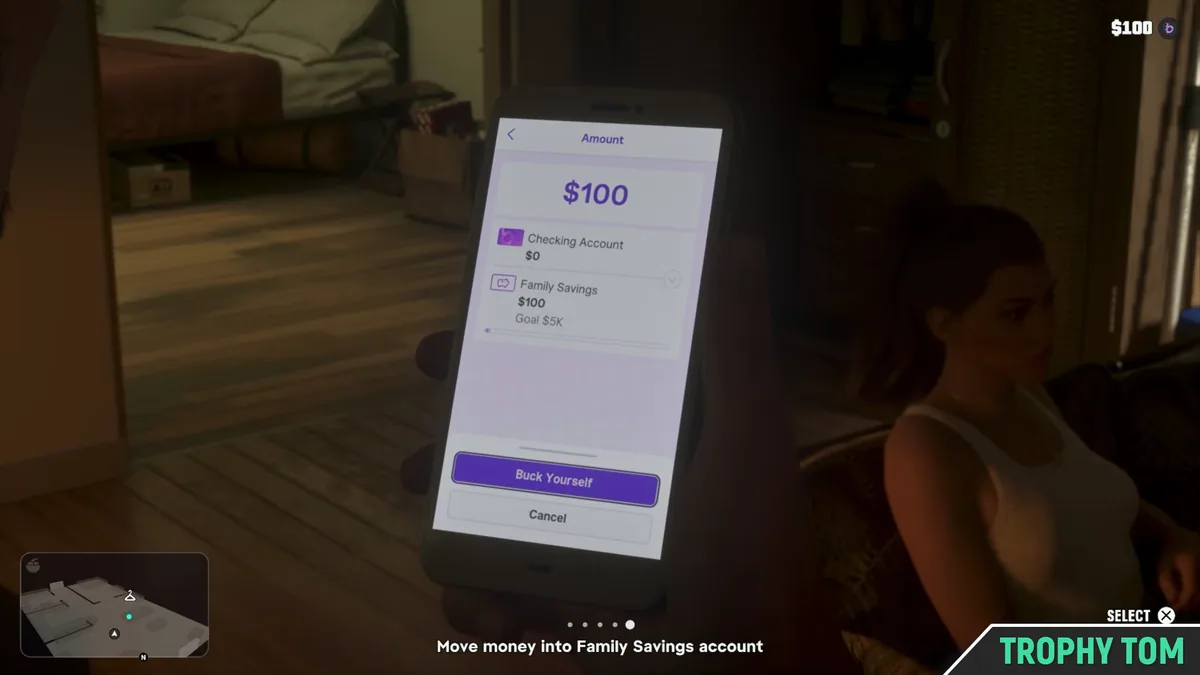
After Lucia calls, visit the Fleeca branch in Key Lento. Speak to the teller, then follow the manager into his office. Back home, open BuckMe on your phone. Select Checking Account, then Buck Yourself to move the $100 welcome bonus into Family Savings. Depositing the cash Jason is carrying at an ATM is a separate objective.
Where can I pick up the video?
| stage | Video passage |
|---|---|
| Open the account | See at 0:35. |
| Transfer the 100 dollars | See at 3:57. |
How do you open BuckMe and complete the first transfer?
Go to the Fleeca bank in Key Lento with Jason. Ask for an account opening at the teller, then follow the manager into his office and sit down. After the appointment, the game brings Jason and Lucia home. Open Jason's phone, select the purple BuckMe app, and log into the main account. Transfer the welcome gift of $100 to Family Savings using the Buck Yourself button, then confirm. The checkmark that appears on the phone indicates that the money has been successfully transferred. You can then put away the phone and join Lucia in the living room.
If you arrived here because you're standing in front of a ATM, first check the instructions for your section. Opening the account, the first transfer to the home, and depositing cash at the ATM correspond to three different screens. The process takes you first through the kiosk and then using the app in the lounge. The ATM intervenes with the goal of depositing available cash after Buck Me. At Trophy Tom, the transfer confirmation is visible 4 minutes and 05 seconds later, while Jason and Lucia are still at home.
When does Lucia call about the bank?
The appointment becomes available after Coming Home, once Lucia has left the prison. PowerPyx places her call about half a day later in the game. She needs an account to receive the compensation for her volunteer work. You can recognize the correct request on the map. At the beginning of Trophy Tom's journey, the preview of the English objective shows Set Up Bank Account and leads to the Fleeca agency. This appointment introduces the characters' bank application in Chapter 1.
On site, locate a ground-floor agency overlooking a parking lot. The filmed area shows the clear facade, its green trim, and the words Financial Services above the windows. Jason crosses the parking lot and then passes through the glass entrance, under a green awning. Look at these elements if the GPS has left you on the roadside. In the video, the counter is already accessible upon entering, even though Lucia is not walking alongside Jason. You can start your request at the counter. Its participation in the appointment becomes evident in the office scene.
Who should you speak to at the Fleeca branch?
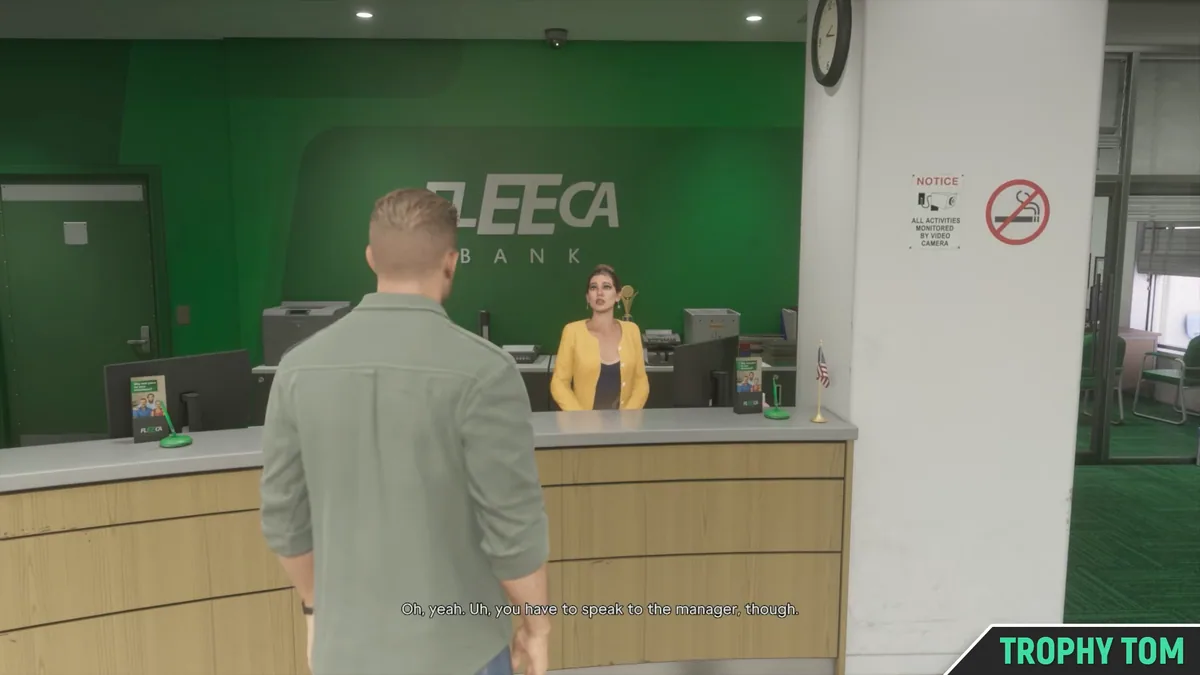
Inside, walk along the light wooden counter and look at the large green wall bearing the name of the bank. The yellow-jacket teller is behind the counter, with the work screens on the other side of the partition. After 35 seconds at Trophy Tom, she explains to Jason that opening an account is handled with their supervisor. This is the first exchange to receive. If the bank name fills your screen but this exchange doesn't start, approach the occupied station and use the dialogue proposal when it appears.
The director is still in the open part of the agency. From the counter, turn to the workspace area to the right. You are looking for a man in a blue patterned shirt leaning over a desk located near the large window overlooking the parking lot. A plant and green chairs help you recognize the location. After 46 seconds, the player approaches him from behind. Once confronted, the man stands up and gets up to his feet. Follow him into the small glass room. If you arrive directly at his empty desk, walk back to his first desk near the window.
Should you mention the cash to the bank manager?
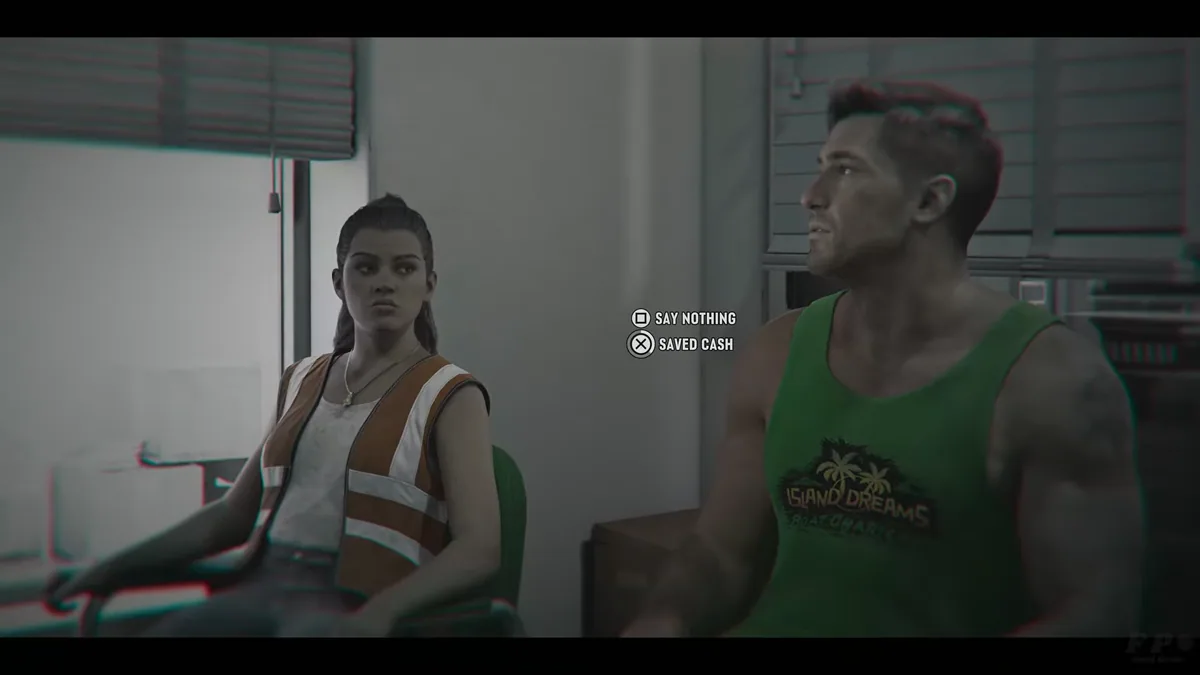
The director sits down behind his computer. The chair reserved for Jason is in front of his desk. When he sits down, the screen zooms in on the conversation. FP Good Game shows a longer version than Trophy Tom's. Lucia is sitting next to Jason and is still wearing her reflective vest in this part. Instead of taking out your phone during the discussion, keep an eye on the responses that might appear near Jason. The director is particularly questioning her about her savings.
At 1 minute and 57 seconds at FP Good Game, the screen becomes dim and two options appear. On the PlayStation footage, the square allows you to stay silent and the cross to indicate the money set aside. The author selects the second option. These are conversation choices. There is no amount to enter here, nor tickets to hand over to the cashier. This passage is useful if you think the game asks you to recover the money from the safe before continuing. You are still in sync with Lucia, and the choice depends on what Jason is willing to tell.
The refusal to open the traditional account is part of the unfolding of the scene. It introduces the BuckMe service. Let the characters finish their interview and leave the agency. At FP Good Game, we still see them standing in front of the facade at 3:42 minutes, then the camera returns to the interior of the house. You can let the transition happen without opening a route to a second bank branch.
How to recognize the application on the phone of Jason?
At home, the scene resumes in the evening. Lucia sits down near the table while the game announces the arrival of BuckMe. At Trophy Tom's, a small notification appears in the bottom right corner of the screen around 2 minutes and 15 seconds. The couple talks for a while longer. Wait until you can order Jason again, then open his phone. On the PlayStation setup described by PowerPyx, pressing up on the directional pad allows you to exit it. You need to see the app grid, not just a preview of the notification.
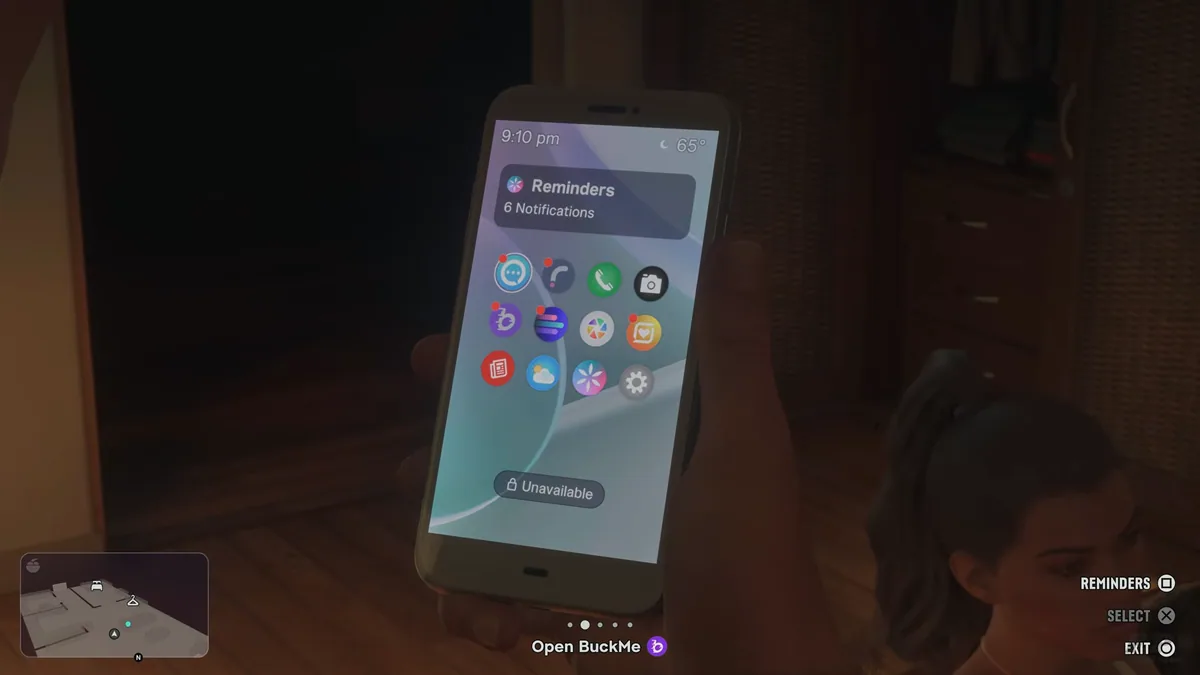
On the screen shown by FP Good Game at 5 minutes and 10 seconds, the icon you are looking for is the first one in the second row. It features a clear symbol on a purple circle, just below the blue icon in the top-left corner. The game reminder, at the bottom of the image, displays the same logo next to the name BuckMe. These two elements help distinguish the banking app from the other purple or blue circles that make up the home screen. Point your selection to this icon and then confirm. The app will launch its presentation before displaying the accounts.
If you see drawn characters, a small animation, and screens in pastel colors, you have therefore opened the correct service. In the Trophy Tom journey, the presentation pages still occupy the phone for 3 minutes and 20 seconds. Continue until you recognize two overlapping account boxes. The reminder then explicitly asks you to select the current account. There is no need to put the phone away with each page change.
Where are the 100 dollar bonus and the Buck Yourself button located?
The first card, purple, represents the checking account. The welcome gift is already shown there. The second corresponds to the family savings account. Before the first transfer, the checking account shows 100 dollars and the savings account is still zero. In the Trophy Tom section, this table is visible at 3 minutes and 54 seconds. If you were supposed to find one hundred dollars on the street or in Jason's bedroom to start, first open this first card. The amount needed is already credited in the app.
On the amount screen, look at the two lines below the large number. One shows the checking account and the other the family savings account. At 3 minutes and 57 seconds, the Trophy Tom form displays $100 at the top. The summary shows zero in the checking account and $100 in the savings account after the transaction. At the bottom, the purple Buck Yourself button is selected. Use this button. The Cancel button below is used to exit the entry. The game is still waiting for confirmation before leaving the amount screen.
The mention of a five-thousand-dollar goal can appear under the savings line from this stage. This is the first step in a longer tracking process. To recognize it, compare the size of the numbers. The form displays the amount of the transfer you are about to make in large letters, while the target associated with the savings is written in smaller letters below the account. The tutorial proceeds by transferring the one-hundred-dollar bonus, without waiting to have collected the entire amount indicated as the future goal.
How to know if the transfer to Family Savings was successful?
The app displays a final window before saving the transaction. At 3 minutes and 59 seconds, it notifies the player that a transfer to savings cannot be withdrawn anymore. Confirm is the top option and Cancel is just below it. Check the direction of the transfer displayed behind the window and then confirm. This precaution will become more important when you want to use money for your purchases in the game. The amounts allocated to Family Savings remain in this reserve, while the checking account allows you to keep a available balance.
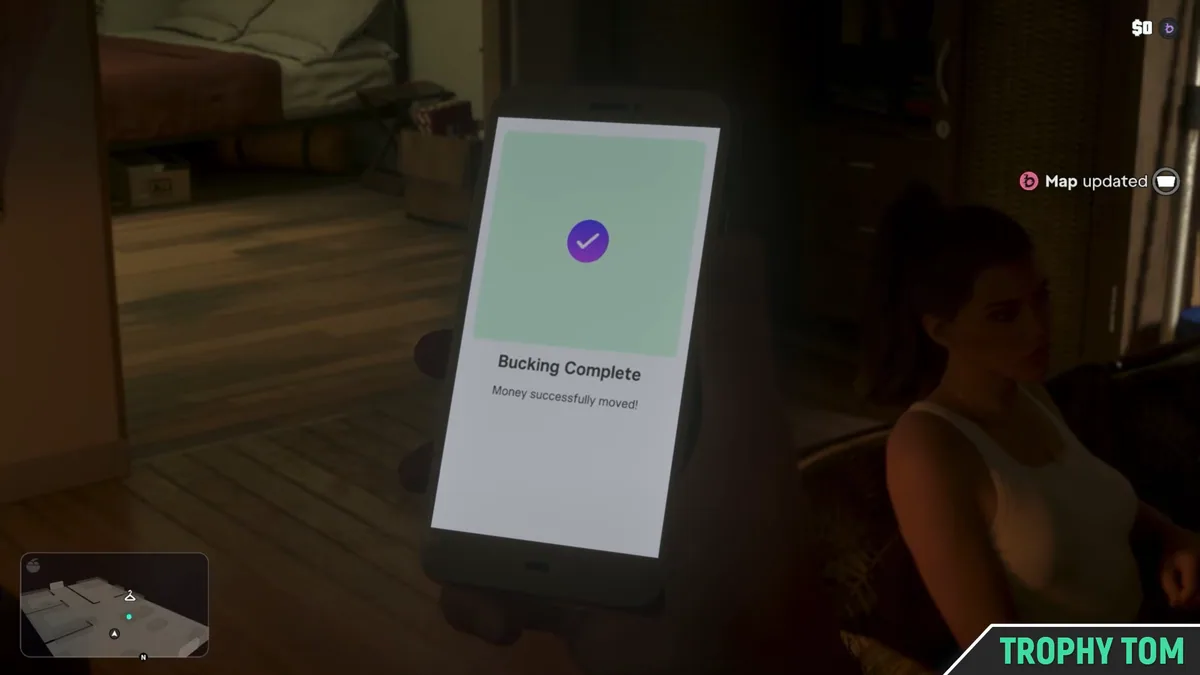
At Trophy Tom, a clear page with a large purple checkmark announces the success in 4 minutes and 05 seconds. The HUD line on the right also indicates a change on the map. Once back to the accounts, the player sees zero in the purple box. This is the expected result of the redistribution of the entire welcome gift. On the previous form, the same 100 dollars were shown in the savings. If you want to clear up the doubt, go back to the table where the two accounts are listed to compare their respective values.
The mission now puts you in control of the living room. You can close the app and put the phone away. Starting at 4 minutes and 27 seconds into this video, Jason joins Lucia near the television, then they sit down on the couch. The conversation continues after the bank transaction. If you keep looking at the phone screen while waiting for a new touch from the tutorial, return to Jason's view and get closer to Lucia. The evening continues until the bedroom. At Trophy Tom, they are seen on the bed at 6 minutes and 39 seconds.
After Buck Me, where should I drop off the tickets that Jason is carrying on him?
The cash deposit task appears separately from opening the account. It is called Deposit Cash Into BuckMe in the English version. Check the list of missions accessible from the map if you don't see any specific destination. PowerPyx indicates that you can use a cash machine of your choice and locate one near Jason. In BuckMe, the ATM Finder function allows you to designate the nearest ATM as the destination. Return to the map to follow the marker, then walk to the machine.
Mr. Lawrence films the manipulation in a separate sequence. At 1 minute 02 seconds, the card is enlarged on the ATM symbol. At 1 minute 08 seconds, Jason stands in front of a machine embedded in a green wall, whose screen illuminates the sidewalk in pink. The edge of the ATM is red. If the mini-card indicates that you have arrived and the menu does not display, look for the facade and place the character directly in front of the machine. No visit to the counter with the employee in yellow is required to use this ATM after account activation.
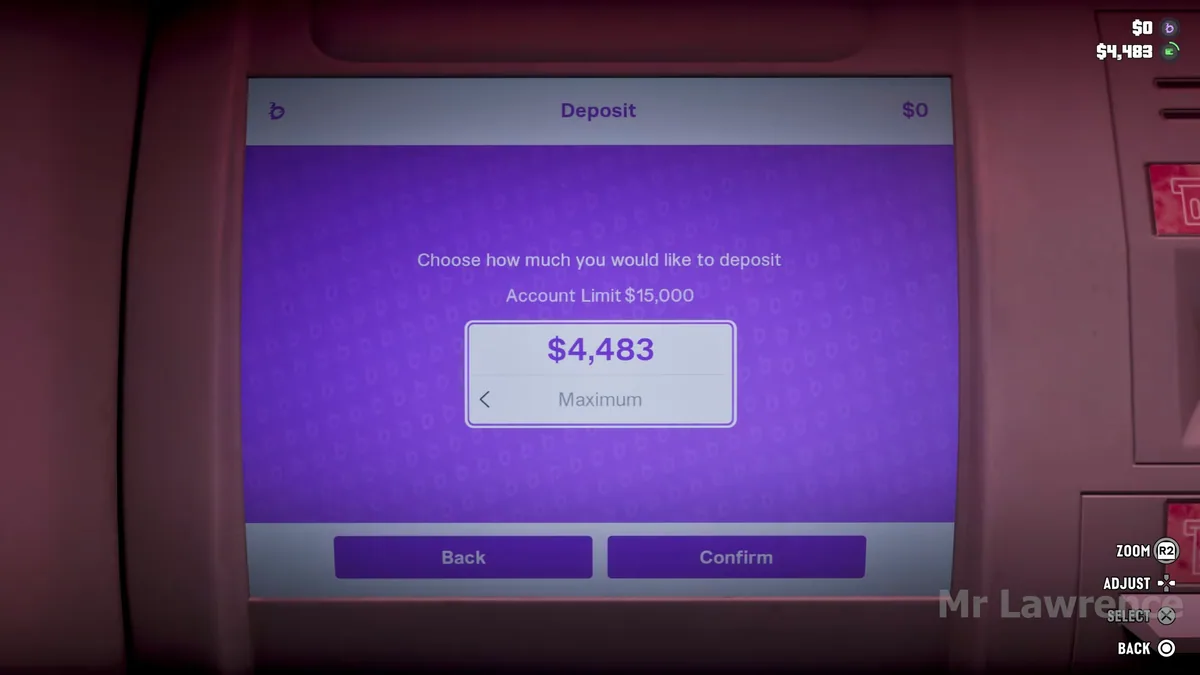
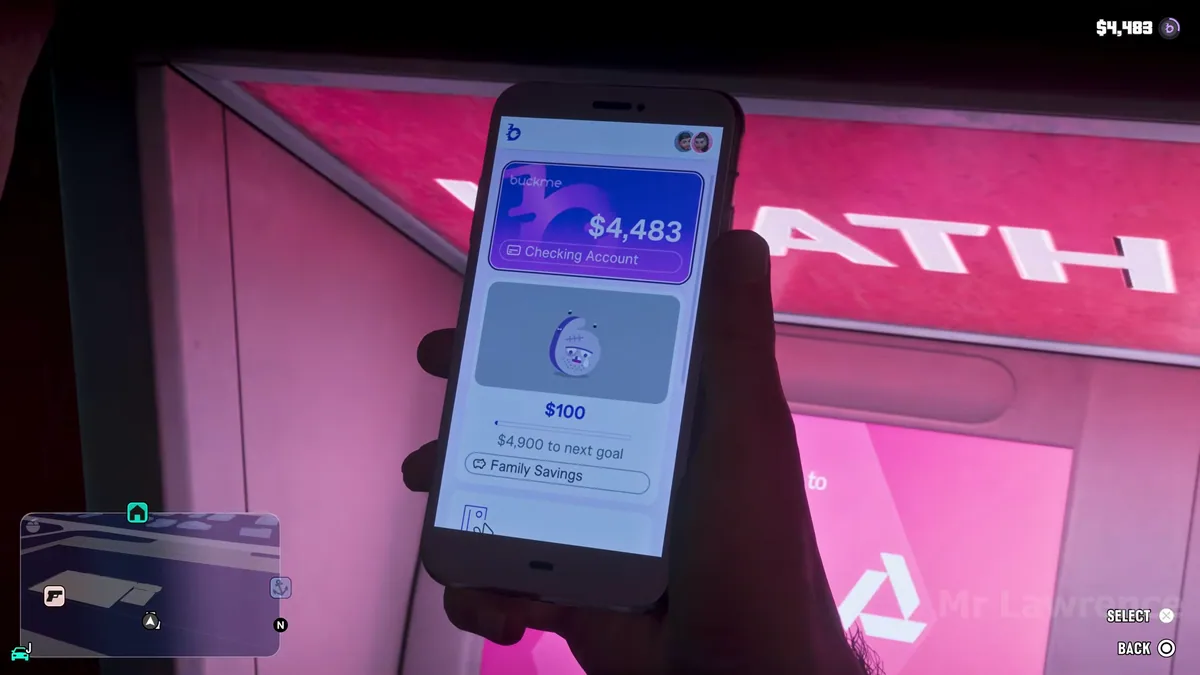
The terminal opens to a menu different from the phone's account page. Select the deposit option. In Mr. Lawrence's video at 1 minute 12 seconds, the machine displays $4,483 because that is the amount of cash transported in this section. The selection is set to maximum. Adjust the amount to deposit the sum you wish, then confirm with Confirm. Your own amount may be very different from the demonstration. The important value is the one displayed on your screen before confirmation.
Check the deposit and distinguish savings from the room bills
A simple check is to reopen the phone in front of the ATM. At 1:20 p.m. at Mr. Lawrence’s, the $4,483 just appeared on the purple card of the checking account. The family savings account still shows the $100 already deposited. This image allows you to track exactly what just happened. The cash went from the pocket to the checking account. The money kept aside during the evening with Lucia remained in the other compartment.
The player then proceeds with a new transaction from their phone. When their savings go from 100 to 200 dollars, this change corresponds to a second transfer selected in the app. The switch to the ATM was already complete. To repeat only a part of the demonstration, stop on the screen that matches your needs. If you want to keep some money available for your next purchases of Jason, check your checking account after the deposit. If you are continuing a savings level, read the new amount and the warning before confirming another transfer.
Finally, the physical reserve in room Jason has its own interaction. Mr. Lawrence opens it around 50 seconds later, before showing the dispenser card. This detour can explain why a player who stored his tickets at home doesn't find the expected amount at the vending machine. Check the actual cash carried when you leave the house. The dispenser offers these tickets, the app shows the current and savings accounts, and the hideout only shows what you have stored in that section.
Frequently asked questions
Where is the director of the Fleeca bank?
After talking to the cashier, look to the right of the counter. He is wearing a blue patterned shirt and standing near the desk by the window. He then takes you to his glass desk.
Where can I find the 100 dollars to open BuckMe?
The welcome amount is already in the checking account. From the first purple tab, transfer it to Family Savings and confirm the confirmation.
How do you know if the transfer worked?
A big check appears on the phone. The checking account drops to zero and the family savings account receives the 100 dollars from the tutorial.
How to deposit cash on BuckMe?
After opening the account, locate a ATM machine using ATM Finder in BuckMe. In front of the machine, select the deposit option, enter the amount, and confirm.
Can we get the money transferred to Family Savings back?
The confirmation window states that the transferred amounts can no longer be withdrawn. Keep what you want to spend in your current account.
Sources
- Trophy Tom · appointment at the bank and home transfer
- FP Good Game · the two possible answers to the director
- FP Good Game · the purple icon on the phone
- Mr Lawrence · card, dispenser and balance after deposit
- VGC · visit to Fleeca and evening with Lucia
- PowerPyx · first transfer on Family Savings
- PowerPyx · separate objective Deposit Cash Into BuckMe